

Introduction
"Hey Nick, I've got this interesting sample if you want to take a look at it. Currently zero detections on VirusTotal."
Now a message like this always piques my interest. As an offensive security professional, I often put my malware analysis hat on to try and stay up-to-date with the latest techniques used in the wild. This is especially true for samples that are going undetected by Endpoint Detection & Response products (which this one was).
I was told the initial lure came in the form of a phishing email advertising a browser extension, "Arcane Wallet Extension". With a bit of Googling, it appeared the email was targeting users of the Arcane Privacy Wallet.
It became clear that we were in fact looking at a fresh phishing campaign with a malicious binary as the payload.
Let's dive in, first by looking at the landing page.
Landing Page
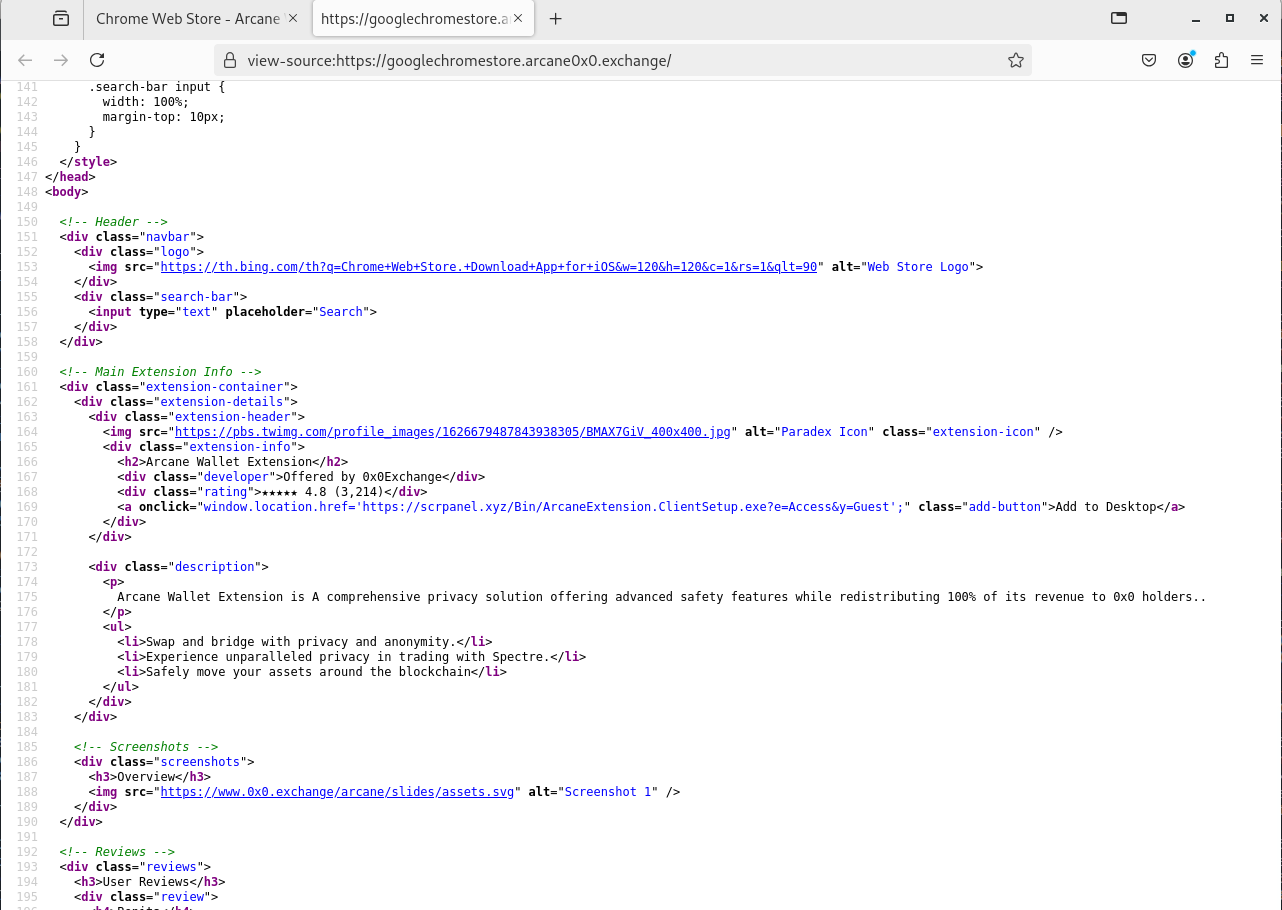
Browsing to the phishing URL, we found what looked like a Google Chrome browser extension. Upon further investigation you should notice that the domain hosting the page is not Google's browser extension store, and is set up to deceive the victim.

I found at least two subdomains that presented the same fake browser extension page.
h[x][x]ps://googlechromestore.arcane0x0.exchange/
h[x][x]ps://www.arcane0x0.exchange/
Naturally, I clicked the "Add to Desktop" button, which redirected to a URL then downloaded a Windows executable, ArcaneExtension.ClientSetup.exe.
h[x][x]ps://scrpanel.xyz/Bin/ArcaneExtension.ClientSetup.exe?e=Access&y=GuestThe download URL could be seen in the original landing page's HTML.
I checked out the root domain from the file download and was presented with something interesting…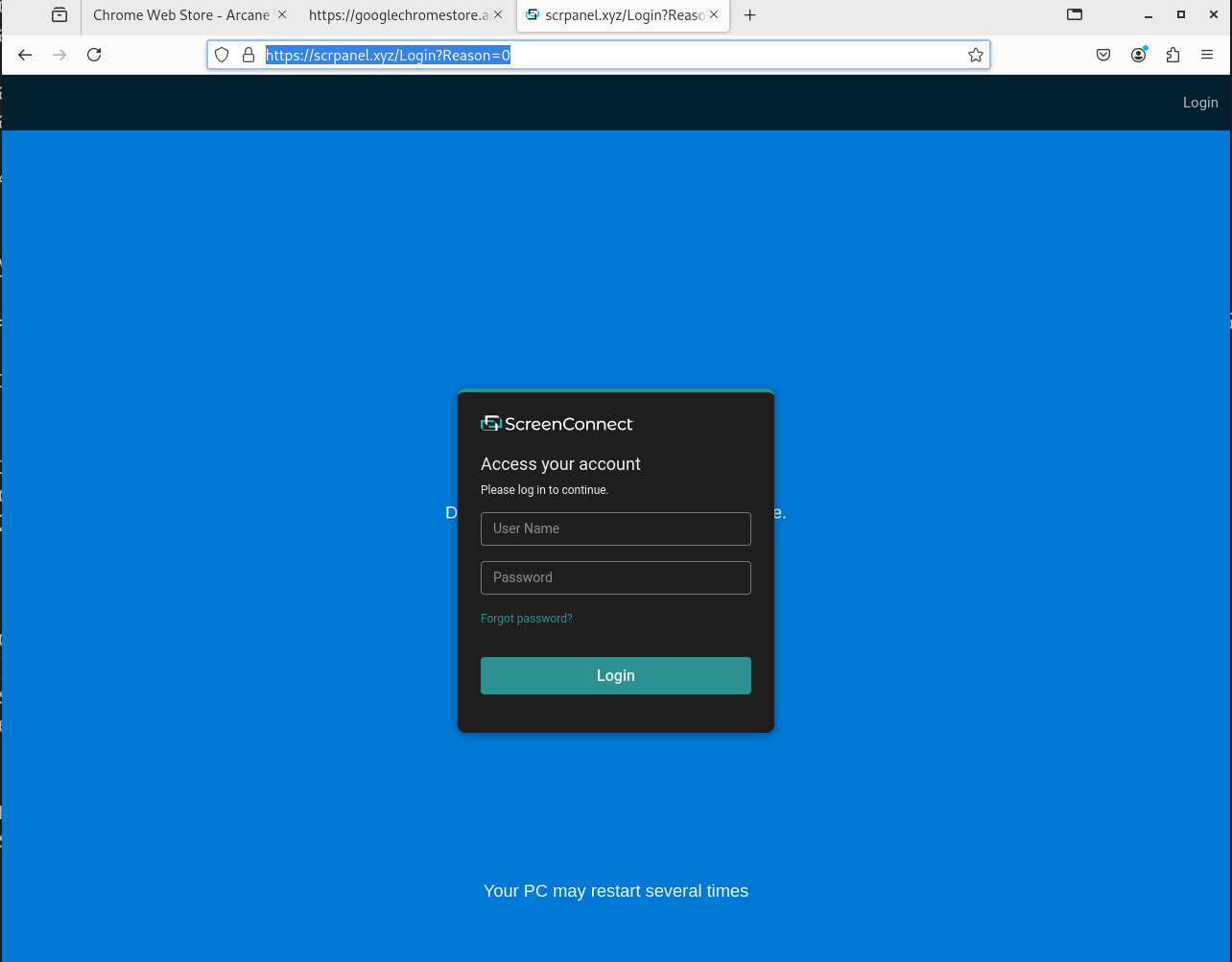
Interesting… it was a ScreenConnect login page.
ScreenConnect is legitimate remote access software, widely used by IT teams across the globe and often abused by threat actors. It consists of a server and clients that have the ScreenConnect agent installed.
At this point, it was safe to assume that the sample probably installs a ScreenConnect agent on the victim, but it is always good to do an analysis to be certain.
Malvertising
At the time of this analysis, if you were to Google search "Arcane Wallet Extension" this phishing page appeared on the first page.
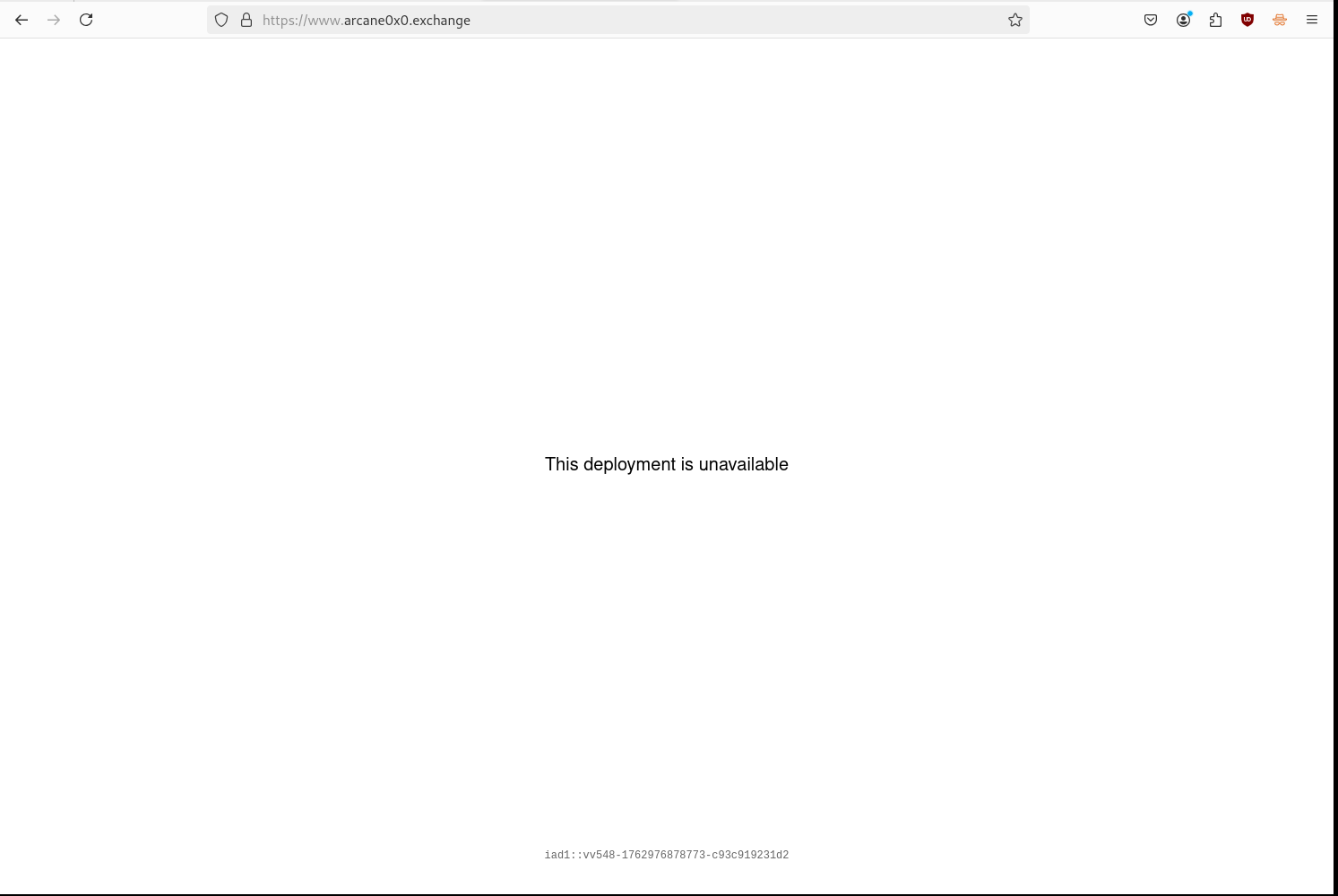
Currently the website appears down, although it still returns a web page.
Malware Analysis
Metadata
First, some metadata about the sample:
- Sample Name:
ArcaneExtension.ClientSetup.exe - File Type: PE32 executable (GUI) Intel 80386, for MS Windows
- MD5:
02c4035d746885aed1cf48646f82cc43 - SHA1:
cc381d737c7774959e8eb2b247d0c977f81345a7 - SHA256:
d40ec53c83f2da70b5af1c1d2ea69f52a2fdff9c748ca860a97bdd41f8c91807 - File Name:
ArcaneExtension.ClientSetup.exe - File Size: 5.5M
- Signed: Signed file, valid signature. Revoked.
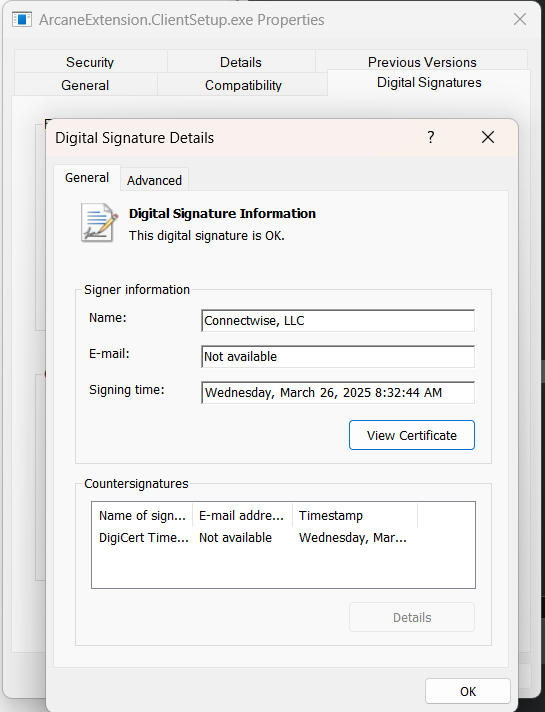
Notably, this sample was signed with a valid digital signature, although the certificate was revoked by ConnectWise due to security concerns, as I discovered here.
Strings Analysis
One string did stand out: another connection host with port 8041, which happens to be the default port ScreenConnect uses for its clients.
fury.anondns.net:8041
scrpanel.xyz
Notably, the domain scrpanel.xyz that hosted the executable resolved to the same IP address as the original phishing page above.
Embedded Resources
The original EXE file contained several embedded resources that could be extracted. Separate analysis was performed on these files to determine their functions.
- Embedded Files:
__ENTRYPOINT(PE32 executable (GUI) Intel 80386 Mono/.Net assembly)__RESOLVER(PE32 executable (GUI) Intel 80386 Mono/.Net assembly)SCREENCONNECT.CORE(PE32 executable (DLL) (console) Intel 80386 Mono/.Net assembly)SCREENCONNECT.WINDOWSINSTALLER(PE32 executable (DLL) (console) Intel 80386 Mono/.Net assembly)SCREENCONNECT.WINDOWS(PE32 executable (DLL) (console) Intel 80386 Mono/.Net assembly)
- Dropped Files:
C:\Users\admin\AppData\Local\Temp\ScreenConnect\25.2.3.9216\9a3bd75eb41d9e7c\ScreenConnect.ClientSetup.msi
Manual Analysis
I analyzed the main PE file by first extracting embedded resources from it. Then I performed some manual analysis in a disassembler to verify what its capabilities were. Next, I analyzed the IL code of two different 2nd-stage .NET Framework assemblies. Finally, I had to do some research on MSI installers created with WiX.
Stage 1 - Native PE
Overview
This was the original EXE file downloaded. It is a native 32-bit portable executable with two .NET assemblies embedded in its resource section.
It does the following:
- Resolves the location of the .NET assemblies in-memory.
- Creates a CLR (Common Language Runtime) environment in the current process.
- Executes the entry point to both .NET assemblies using the CLR environment.
Native PE x86 (exe)
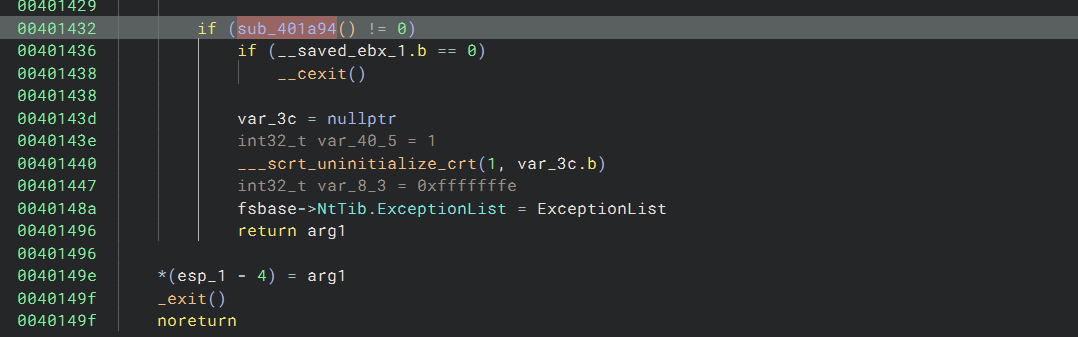
First, it uses SetDefaultDllDirectories with the LOAD_LIBRARY_SEARCH_SYSTEM32 flag.
This sets the default search directory for DLLs to %windows%\system32.

Next, it resolves the CLRCreateInstance function and creates a new CLR instance (to be able to execute .NET assemblies in the current process).
It uses one of three interfaces to get a runtime interface for the specific CLR version "v4.0.30319".
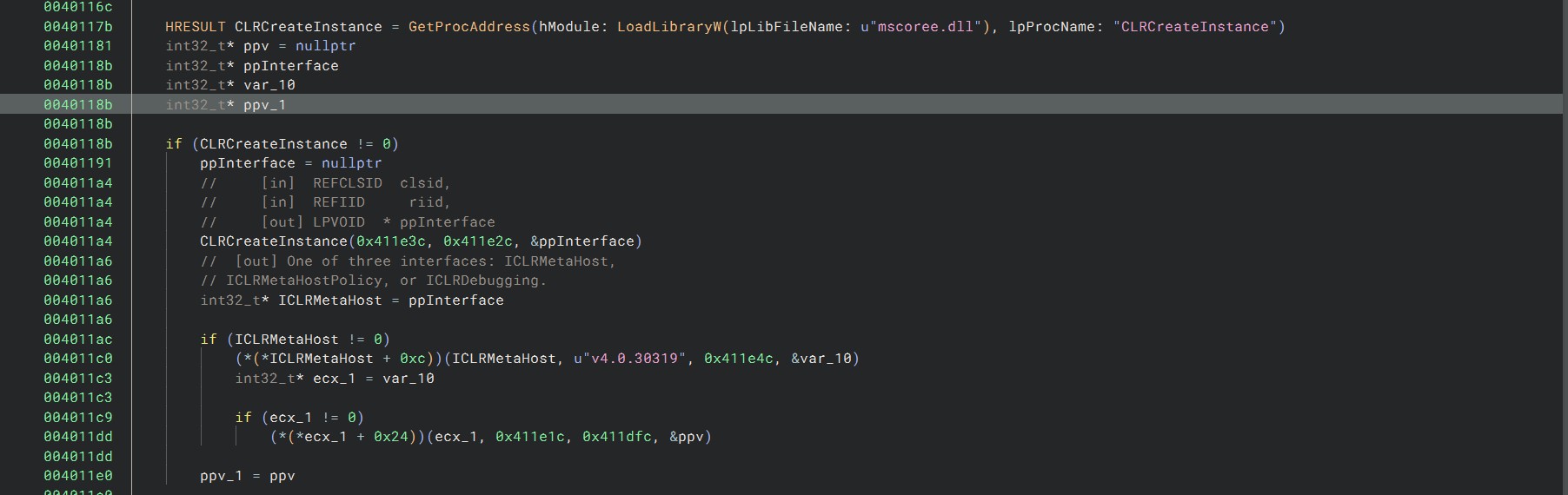
Then, a subroutine is called twice.

It extracts the files embedded in the .rsrc section of the PE (the .NET assemblies). It uses FindResourceW, LockResource, and LoadResource to load the binary blobs _RESOLVER and _ENTRYPOINT.

It passes the safe array of the .NET blobs to the COM/.NET interface, prepares the arguments for the .NET assemblies, and executes the .NET entry points.
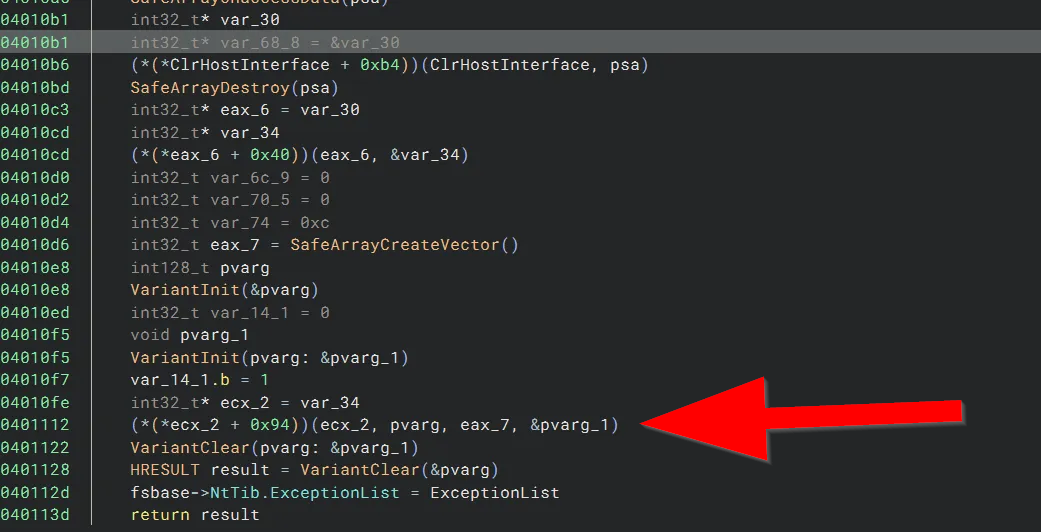
Previously I had extracted these .NET assembly files using manalyze, so this was all starting to come together.
remnux@remnux:~/Samples/Arcane0x0/out$ file ArcaneExtension.ClientSetup__*
ArcaneExtension.ClientSetup__ENTRYPOINT_FILES.raw: PE32 executable (GUI) Intel 80386 Mono/.Net assembly, for MS Windows
ArcaneExtension.ClientSetup__RESOLVER_FILES.raw:   PE32 executable (GUI) Intel 80386 Mono/.Net assembly, for MS Windows
The .NET files that get loaded and executed in-memory basically execute an MSI installer, but the analysis of those files will come later on.
The last thing it does is perform a check to see if the CLR was properly loaded into the current process, then unloads it if so.
Stage 2 - Embedded .NET Assemblies
Overview
The nice thing about .NET assemblies is that they aren't really compiled. They are just converted into an Intermediate Language (IL) bytecode for the .NET runtime to execute.
Thus, we can just load them into a .NET disassembler and practically view the source code.
A few .NET assemblies are loaded in-memory and executed in the original process. This drops ScreenConnect's legitimate MSI installer to disk and tries to silently install it.
Embedded Resources
I extracted all of the resource files within the PE. There were all of the installation files for ScreenConnect and two additional custom .NET assemblies.
remnux@remnux:~/Samples/Arcane0x0$ manalyze -dresources -dexports -x out/ ArcaneExtension.ClientSetup.exe
* Manalyze 0.9 *

-------------------------------------------------------------------------------
/home/remnux/Samples/Arcane0x0/ArcaneExtension.ClientSetup.exe
-------------------------------------------------------------------------------

Resources:
----------
SCREENCONNECT.CORE, VERSION=25.2.3.9216, CULTURE=NEUTRAL, PUBLICKEYTOKEN=4B14C015C87C1AD8:
    Type:          FILES
    Language:      UNKNOWN
    Codepage:      Latin 1 / Western European
    Size:          550912
    TimeDateStamp: 1980-Jan-01 00:00:00
    Entropy:       6.03365

SCREENCONNECT.WINDOWS, VERSION=25.2.3.9216, CULTURE=NEUTRAL, PUBLICKEYTOKEN=4B14C015C87C1AD8:
    Type:          FILES
    Language:      UNKNOWN
    Codepage:      Latin 1 / Western European
    Size:          1729024
    TimeDateStamp: 1980-Jan-01 00:00:00
    Entropy:       6.64049

SCREENCONNECT.WINDOWSINSTALLER, VERSION=25.2.3.9216, CULTURE=NEUTRAL, PUBLICKEYTOKEN=4B14C015C87C1AD8:
    Type:          FILES
    Language:      UNKNOWN
    Codepage:      Latin 1 / Western European
    Size:          109568
    TimeDateStamp: 1980-Jan-01 00:00:00
    Entropy:       5.96226

_ENTRYPOINT:
    Type:          FILES
    Language:      UNKNOWN
    Codepage:      Latin 1 / Western European
    Size:          3076888
    TimeDateStamp: 1980-Jan-01 00:00:00
    Entropy:       7.85762

_RESOLVER:
    Type:          FILES
    Language:      UNKNOWN
    Codepage:      Latin 1 / Western European
    Size:          5632
    TimeDateStamp: 1980-Jan-01 00:00:00
    Entropy:       3.8513

1:
    Type:          RT_MANIFEST
    Language:      English - United States
    Codepage:      Latin 1 / Western European
    Size:          392
    TimeDateStamp: 1980-Jan-01 00:00:00
    Entropy:       4.89623
The files with their file types can be seen below.
remnux@remnux:~/Samples/Arcane0x0$ file out/*
out/ArcaneExtension.ClientSetup_1_RT_MANIFEST.xml: XML 1.0 document text
out/ArcaneExtension.ClientSetup__ENTRYPOINT_FILES.raw: PE32 executable (GUI) Intel 80386 Mono/.Net assembly, for MS Windows
out/ArcaneExtension.ClientSetup.p7b: ASCII text
out/ArcaneExtension.ClientSetup__RESOLVER_FILES.raw: PE32 executable (GUI) Intel 80386 Mono/.Net assembly, for MS Windows
out/ArcaneExtension.ClientSetup_SCREENCONNECT.CORE, VERSION=25.2.3.9216, CULTURE=NEUTRAL, PUBLICKEYTOKEN=4B14C015C87C1AD8_FILES.raw: PE32 executable (DLL) (console) Intel 80386 Mono/.Net assembly, for MS Windows
out/ArcaneExtension.ClientSetup_SCREENCONNECT.WINDOWSINSTALLER, VERSION=25.2.3.9216, CULTURE=NEUTRAL, PUBLICKEYTOKEN=4B14C015C87C1AD8_FILES.raw: PE32 executable (DLL) (console) Intel 80386 Mono/.Net assembly, for MS Windows
out/ArcaneExtension.ClientSetup_SCREENCONNECT.WINDOWS, VERSION=25.2.3.9216, CULTURE=NEUTRAL, PUBLICKEYTOKEN=4B14C015C87C1AD8_FILES.raw: PE32 executable (DLL) (console) Intel 80386 Mono/.Net assembly, for MS Windows
RESOLVER (Mono/.Net assembly)
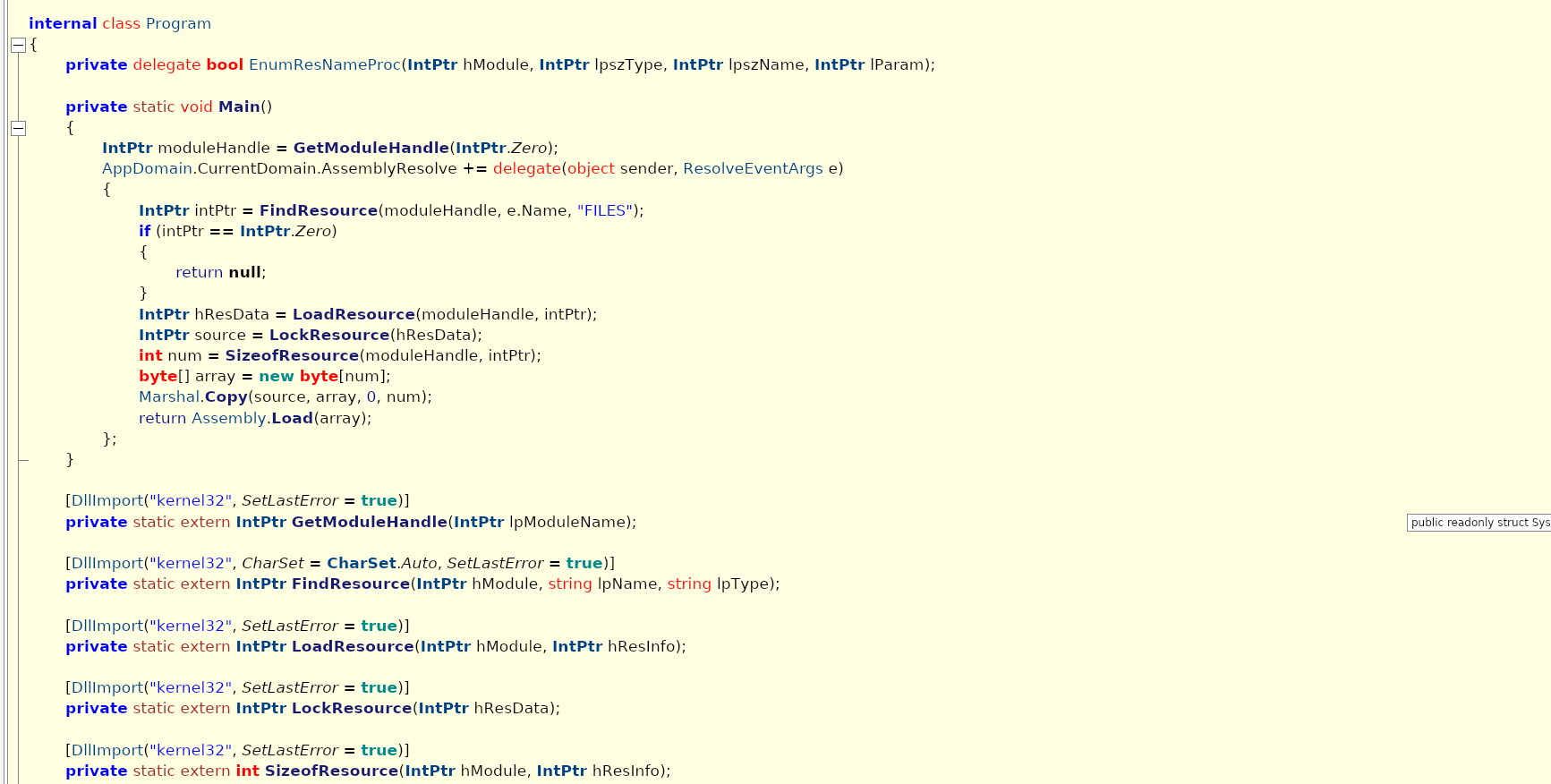
After reading through the disassembly, it was determined that this file just resolved another .NET file and executed it.
- This file gets loaded and executed within the original unmanaged process.
- It resolves missing assembly names from the resource section of the binary.
- Uses the Windows APIs
GetModuleHandle,FindResource,LoadResource,LockResourceto resolve resources.
- Uses the Windows APIs
- Loads another assembly into current process memory.
ENTRYPOINT (Mono/.Net assembly)
- This file gets loaded and executed within the original unmanaged process.
- Extracts an MSI file from resources and drops it to a temp directory as
ScreenConnect.ClientSetup.msi. - Signs the MSI file with a digital signature.
- Builds a command string to silently launch
msiexec.exe /i /qn ScreenConnect.ClientSetup.msi. - Then executes it with
Process.Start().
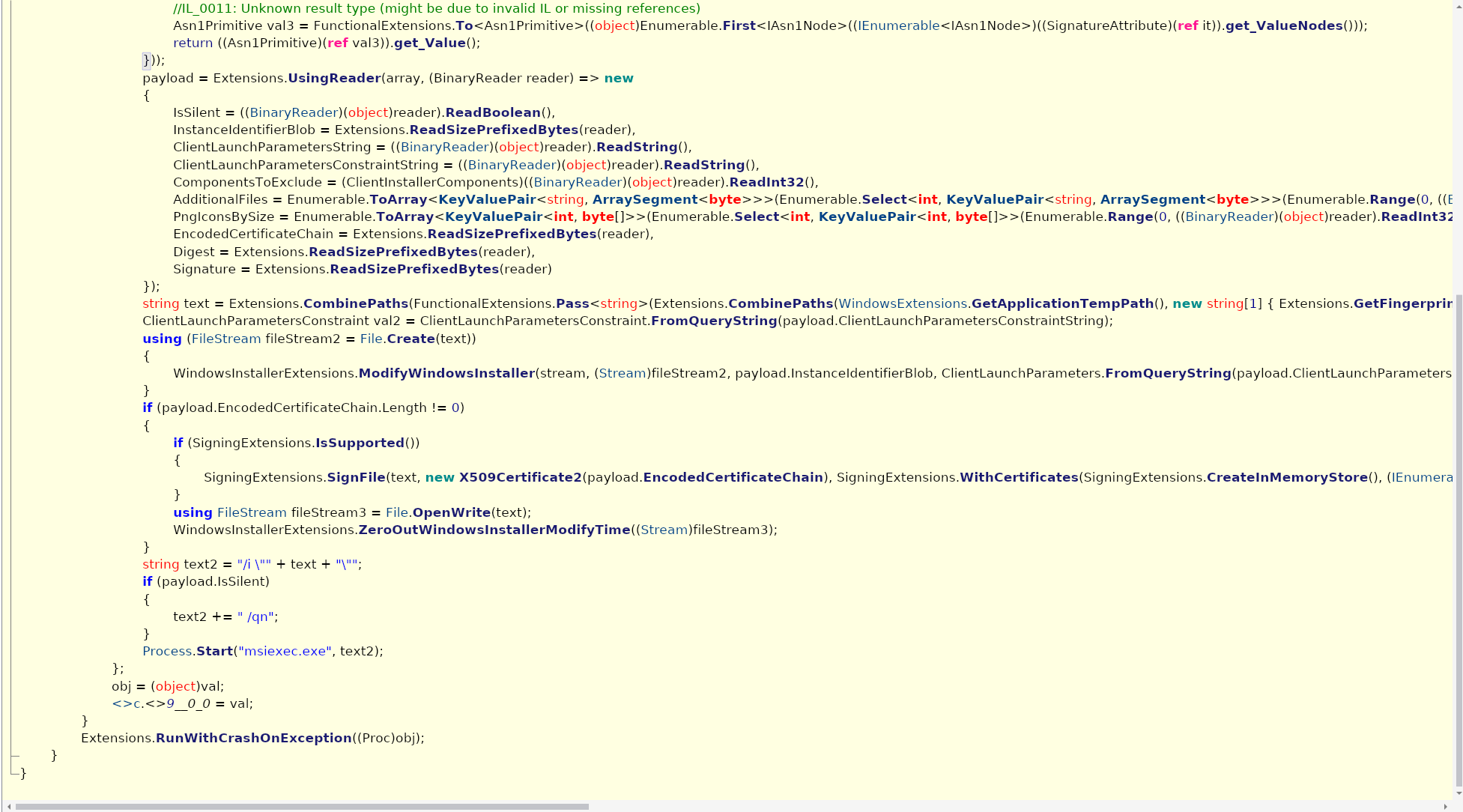
The final installation string gets built and tries to kick off msiexec.exe.
"C:\Windows\System32\msiexec.exe" /i "C:\Users\admin\AppData\Local\Temp\ScreenConnect\25.2.3.9216\9a3bd75eb41d9e7c\ScreenConnect.ClientSetup.msi"I discovered that the MSI installer was generated using WiX Toolset, which is a legitimate tool used to create MSI packages.
ScreenConnect actually uses WiX under the hood, so this wasn't another piece of malware but the legitimate ScreenConnect MSI installer.
Stage 3 - ScreenConnect MSI Installer
Overview
This is the legitimate installer for ScreenConnect. The MSI file was generated using WiX, which has some associated IOCs because WiX Toolset has been abused for creating malicious installers in the past.
MSI installers created with WiX do this weird thing where they drop a DLL and invoke the function zzzzInvokeManagedCustomActionOutOfProc from it.
rundll32.exe %temp%\MSI*.tmp, zzzzInvokeManagedCustomActionOutOfProc SfxCA_1533328 1 ScreenConnect.InstallerActions!ScreenConnect.ClientInstallerActions.FixupServiceArgumentsThis behavior was flagged by sandboxes, but it's actually just part of how all MSI installers generated from WiX work.
I tracked down this behavior in the WiX source code here, so we don't really need to investigate this part any further.
const wchar_t* entry = L"zzzzInvokeManagedCustomActionOutOfProc";Dynamic Sandbox Results
I threw this sample into a few different sandboxes, which confirmed all of the details from the analysis above.
Sandbox results:
- VirusTotal - https://www.virustotal.com/gui/file/d40ec53c83f2da70b5af1c1d2ea69f52a2fdff9c748ca860a97bdd41f8c91807
- Joe Sandbox - https://www.joesandbox.com/analysis/1711444/0/html
- ANY.RUN - https://app.any.run/tasks/e6348df8-d062-4033-82a9-81fd2b2f7401
Closing
At the time of analysis this sample was unknown to all of these sandboxes. After extracting any useful takeaways, we reported it to the appropriate vendors for takedown.
Our Offensive Security Team regularly dives into the latest malware tactics, techniques, and procedures to better deliver a threat-led approach for our proactive services.

Part of the Armada team: CREST-accredited team members who run continuous exposure management and red teaming for our clients.